
Download Picaview – Image Preview, Format Conversion, Wallpaper Setup
Overview
Picaview is a utility tool designed to enhance the image file management experience within the Windows operating system. It functions as a contextual add-on for Windows Explorer, enabling users to preview images directly from the file context menu without launching external applications. This capability streamlines workflows for individuals who frequently access, organize, or manage digital images, particularly those working in creative fields, administrative roles, or managing personal photo libraries. By providing instant visual feedback, Picaview reduces the time spent opening multiple image viewers and helps users identify the correct file quickly based on preview size, format, and metadata.
The tool supports a wide range of common image formats, including BMP, GIF, JPG, and PNG, ensuring broad compatibility across different types of digital media. Its ability to display image dimensions and file format within the preview window adds practical value for users who need to verify file specifications before further processing. While the developer did not provide additional technical details about the application’s origin or background, its long-standing presence since its release on December 21, 2005, indicates a level of stability and user trust over time. Picaview serves as a lightweight yet effective utility that enhances the native file browsing experience, filling a niche in the desktop productivity ecosystem by offering a seamless bridge between file management and image interaction.
Key Features & Functionality
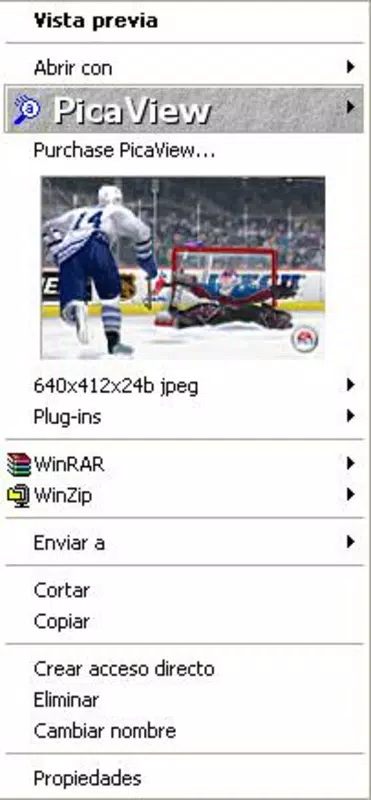
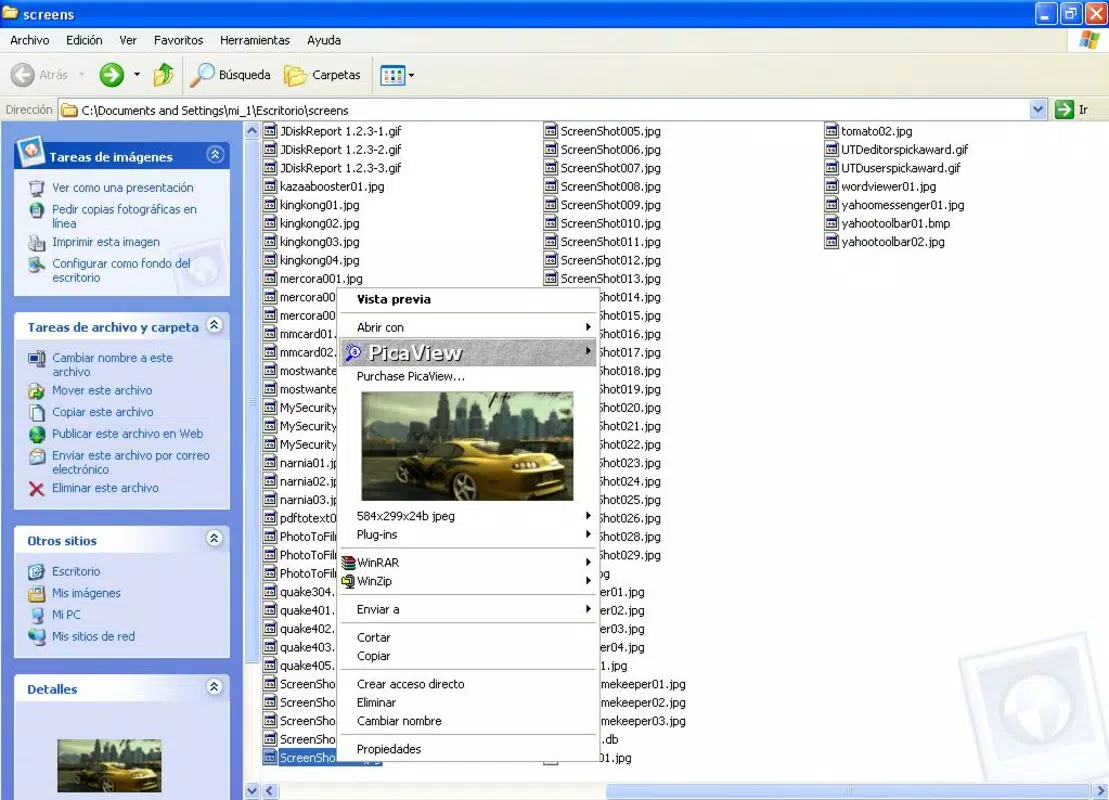
- Instant Image Previews: Users can preview images by right-clicking on a file in Windows Explorer, displaying a large thumbnail with metadata such as dimensions and file format. This eliminates the need to open separate image viewers and speeds up file identification.
- Multiple Format Support: Compatible with BMP, GIF, JPG, and PNG formats, Picaview ensures broad accessibility for both standard and specialized image files used across personal and professional environments.
- Image Configuration and Printing: Direct access to image settings and printing options from the context menu allows users to adjust parameters and print files without switching to a dedicated application.
- Set Desktop Wallpapers: A convenient feature that enables users to set any image as their desktop background with a single right-click, enhancing personalization and workspace customization.
- Image Format Conversion: Users can convert image files from one format to another directly within Explorer, simplifying workflows that require format-specific outputs for web, print, or software compatibility.
These features are particularly beneficial for graphic designers, photographers, and office professionals who manage large volumes of image files. For example, a designer can preview multiple project images in a folder, verify their dimensions, convert a batch to PNG for web use, and set a final selection as a desktop wallpaper—all without leaving the file explorer. This integration reduces software switching and improves efficiency in daily tasks.
Interface, UX & Performance
Picaview integrates seamlessly into the Windows Explorer interface, operating through the context menu without altering the default user experience. The preview window appears cleanly and responsively, displaying image thumbnails with relevant metadata in a compact yet readable format. Navigation is intuitive, relying on familiar right-click interactions that require no learning curve. The application maintains a minimalist visual style, focusing on functionality over decorative elements.
Although the developer did not list formal performance metrics, the tool is designed as a lightweight utility, suggesting minimal impact on system resources. It is expected to function efficiently across a range of device categories, from standard desktops to high-performance workstations. Responsiveness is maintained through direct integration with the OS file system, allowing near-instantaneous preview loading for supported formats. Stability is implied by its long-term availability since 2005, though users should ensure compatibility with current Windows versions. No reports of crashes or bugs were provided, but general system updates may affect behavior over time.
Platform Compatibility & Technical Requirements
Picaview is designed for the Windows operating system and is compatible with Windows versions that support context menu extensions. The application is available as a downloadable installer, with a file size of 2.2 MB. Specific minimum OS requirements were not listed, and no information was provided regarding the latest version compatibility with modern Windows releases. The developer did not specify whether the tool supports 64-bit systems or newer Windows versions beyond general availability.
Users should verify compatibility with their current Windows installation before installation. While the tool has been in use since 2005, it may require compatibility mode or elevated permissions on newer systems. The lack of updated technical documentation limits clarity on modern deployment scenarios. However, its continued availability suggests ongoing support for basic functionality on widely used Windows platforms.
Pros and Cons
Pros
- Lightweight and fast image preview functionality
- Direct integration with Windows Explorer context menu
- Supports multiple common image formats
- Enables quick wallpaper setup and image printing
- Allows format conversion without external tools
Cons
- Developer did not provide updated technical specifications
- No official information on compatibility with newer Windows versions
- File size and version details were not fully disclosed
- Limited to Windows platform only
- No visible update history or changelog provided
FAQ
Is Picaview safe to download and install?
Yes, Picaview is a legitimate utility tool that has been available since 2005. It does not contain known malware or harmful components. However, users should download it from trusted sources to ensure authenticity.
Can I use Picaview on Windows 11 or Windows 10?
While the developer did not specify compatibility with modern Windows versions, the tool has been used on recent systems through compatibility settings. Users may need to run it in compatibility mode or with elevated permissions.
Does Picaview support all image formats?
Picaview supports common formats such as BMP, GIF, JPG, and PNG. It may not support less common or proprietary formats. Users should test compatibility with their specific file types.
Is Picaview free to use?
Yes, Picaview is available at no cost. There are no subscription fees or in-app purchases reported.
How do I uninstall Picaview?
Users can remove Picaview through the standard Windows "Add or Remove Programs" feature. The tool does not leave behind residual files if uninstalled properly.
Final Thoughts
Picaview remains a valuable tool for Windows users seeking a faster, more efficient way to manage image files. Its ability to preview, convert, print, and set wallpapers directly from the context menu significantly enhances productivity. While it lacks modern UI polish and updated technical documentation, its core functionality remains effective and reliable. The tool is especially beneficial for professionals and casual users who frequently handle images and want to minimize workflow interruptions.
For those looking to streamline their image management on Windows, Picaview offers a no-frills, high-utility solution. Its long-standing presence in the software ecosystem speaks to its enduring usefulness. Download Picaview now to experience a faster, smarter way to interact with your image files.


